
Badge Usage Guidelines
Using the Not By AI badges is easy. Below are some useful guides that help you implement the badges so that you can make sure that your users and audience can easily identify your human-centric content.
The Overall Process
As cheesy as it sounds, it is as easy as 1, 2, 3. If you know how to create awesome human-made content, you know how to add a badge.
Download
First, download the Not By AI badges. You may need to submit your project if you are interested in obtaining a Project Page.

Insert
Follow the "What Are You Creating?" instructions below to insert your badges.
Link
Link the badges to notbyai.fyi or your Project Page when hyperlinking is possible. Learn how to link your badges.
Badge Usage Guidelines
The following guidelines and best practices provide instructions on how to use the Not By AI badges.
- Linking the badge is strongly recommended as it allows your audience to learn more about the Not By AI mission. For assistance with linking the badge, please refer to How Do I Link My Not By AI Badge?.
- Respect the clear space: Clear space is the surrounding area around the badge that should avoid any content. The minimum clear space is the x-height of the Not By AI typemark, as shown below.
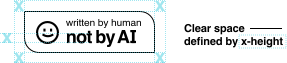
- Minimum Size: To ensure legibility, maintain a minimum display height of 42 px for screens with any resolution. However, use the @2x version of the image while maintaining a height of 42 px to ensure clarity and sharpness.
- While the Not By AI badge is meant to be noticeable, the content creator is welcome to place the badge in a less visible area, such as a website footer, the plaque for your art, or the back of an album, to prevent the badge from visually competing with your content.
- Generally speaking, use PNG if it is the only image format your platform supports. Use SVG if you are not limited to platform restrictions and are working on a web-based project. Use EPS if you are working on a print or physical project. For more information about which image format to pick, refer to Which Image File Format Should I Use?
- Do not alter the badge: The badge should not be altered or modified in any way.
Incorrect badge usage examples:

Do not rewrite the badge

Do not replace any colors in the badge

Do not add effects to the badge

Do not make changes to badge elements

Do not shrink the badge below the minimum size

Make sure the badge is legible
For instructions on how to insert the badges based on your content type, refer to How to Add the Not By AI Badges.
Pro tip: Don't know which image format to use? Check out our image format guide.
Another pro tip: You should always link your badge when it's possible.
Implementation by Content Type
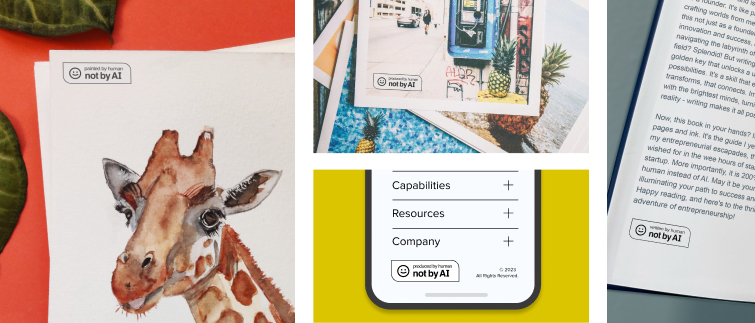
Depending on the content type and how important it is to you to convey the message of Not By AI, you have the flexibility to choose where to display the Not By AI badge. Some users may prefer the badge to be prominent while others opt for a non-intrusive approach.
Below are our recommendations but feel free to alter them to meet your needs.
What Are You Creating?
Find the best places to display your Not By AI badge.
Using the badge across your overall creative work?
Still Need Help?
If you have questions that are not answered above, feel free to send us a message! We want to learn what our users are encountering to better improve ourselves.
Please, grab a chair and tell us everything.
Contact Us